Cold email outreach that runs on your server, not someone else's.
SubsiMail is a self-hosted sequencing tool. Your prospect list, your templates, and your connected inboxes live in your own database — we can't read them, can't sell them, and can't lock you out. No per-seat pricing. No content review. No account bans.
No install, no card details — a real, working copy of SubsiMail, ready in seconds.
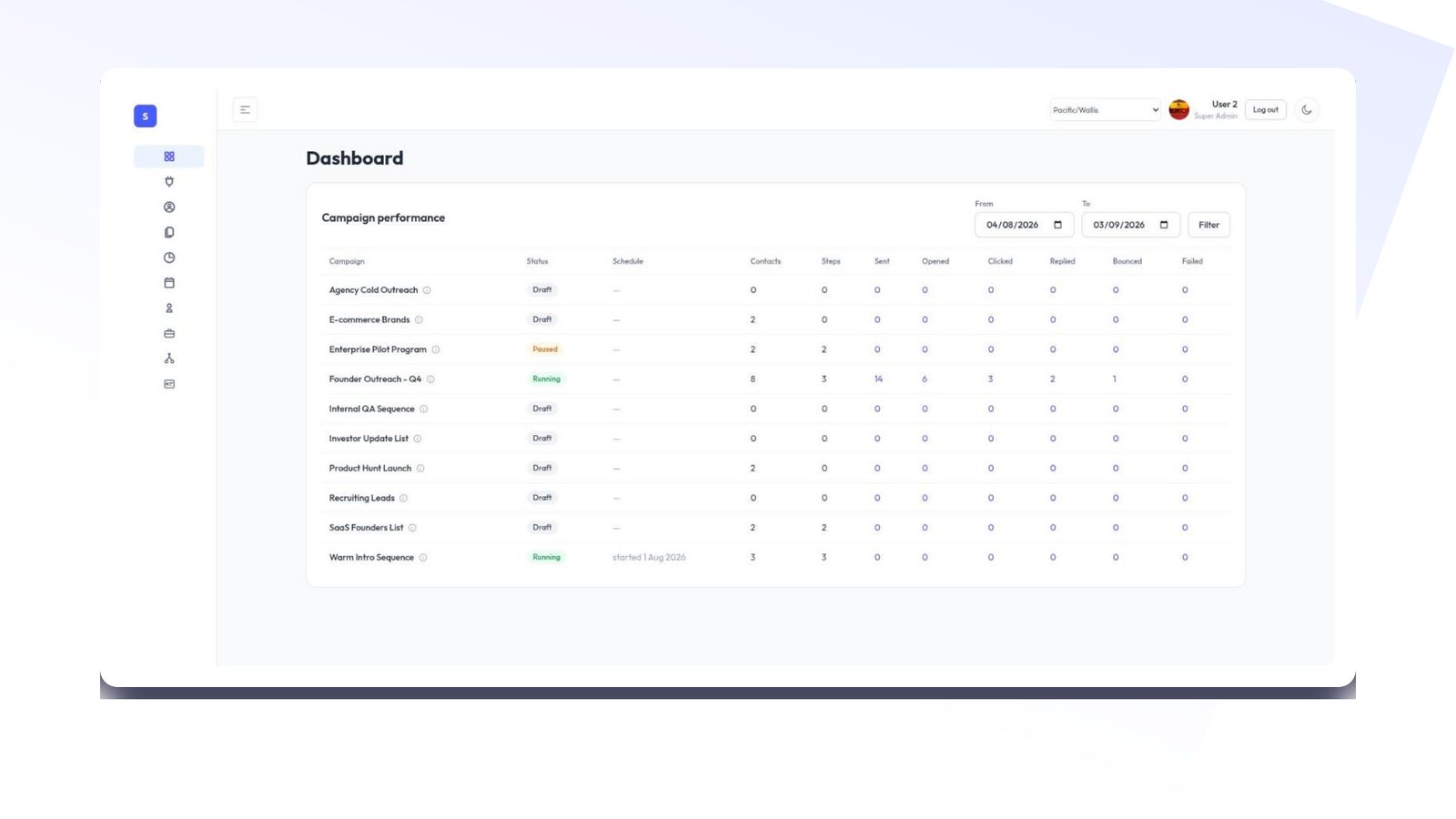
Your list is yours. We can't see it — by design.
Every hosted outreach tool asks you to upload your prospect list to their servers. Then they get acquired, leak a database, or quietly train on your data. SubsiMail runs entirely on your machine. The only network call it makes to us is a periodic license check — your license key, a random install ID, your app version, which build it is (Linux, Windows or Docker), and two running totals (emails sent, campaigns), so your account page can show them. Your contacts, your email content, who you're writing to, and your reply data never leave your server.
No third party holds your prospects
Your contacts sit in a PostgreSQL database on your server — bundled with SubsiMail, nothing to install. We have no copy, no access, and no way to hand it to anyone.
Your inbox stays your inbox
You connect Gmail, Outlook, or SMTP directly. Mail flows through your account — no shared relay reading your outbound.
You're the data controller
For GDPR, CCPA and similar law, the contact data never leaves your control. No vendor DPA to chase.
No lock-in, ever
Cancel your license and the app keeps your data intact. Export contacts to CSV any time. It's your database.
Write what you want. Send to whoever you want.
Hosted platforms review your templates and block anything that looks "too promotional," and they ban whole industries outright. SubsiMail never inspects your content and has no prohibited-industry list. Your sending limits are the ones your own email provider sets — nothing more.
Industries commonly rejected by hosted outreach tools — all fine here. You're responsible for sending lawfully; we don't get a veto.
Why self-host
Your own sender reputation
You send through your own connected inbox — no shared IP pool, so your deliverability never suffers for another tenant's spam.
Predictable, flat cost
You pay per connected inbox, not per seat and not per contact. Add your whole team without the bill moving.
No external uptime dependency
Your sequences don't pause because a SaaS provider had an outage. It's your server, your uptime.
Runs anywhere
One container on Docker, Linux (including Raspberry Pi), or Windows. A $5/month VPS handles most teams.
One tenant: you
No shared sending pool, no noisy-neighbor throttling, no landing on a blocklist because of someone else's campaign.
Upgrade on your schedule
New versions are a docker compose pull. No forced migrations, no feature you depend on getting deprecated out from under you.
See the product
Same core workflow as the hosted tools you already know.
Everything a cold-email tool needs
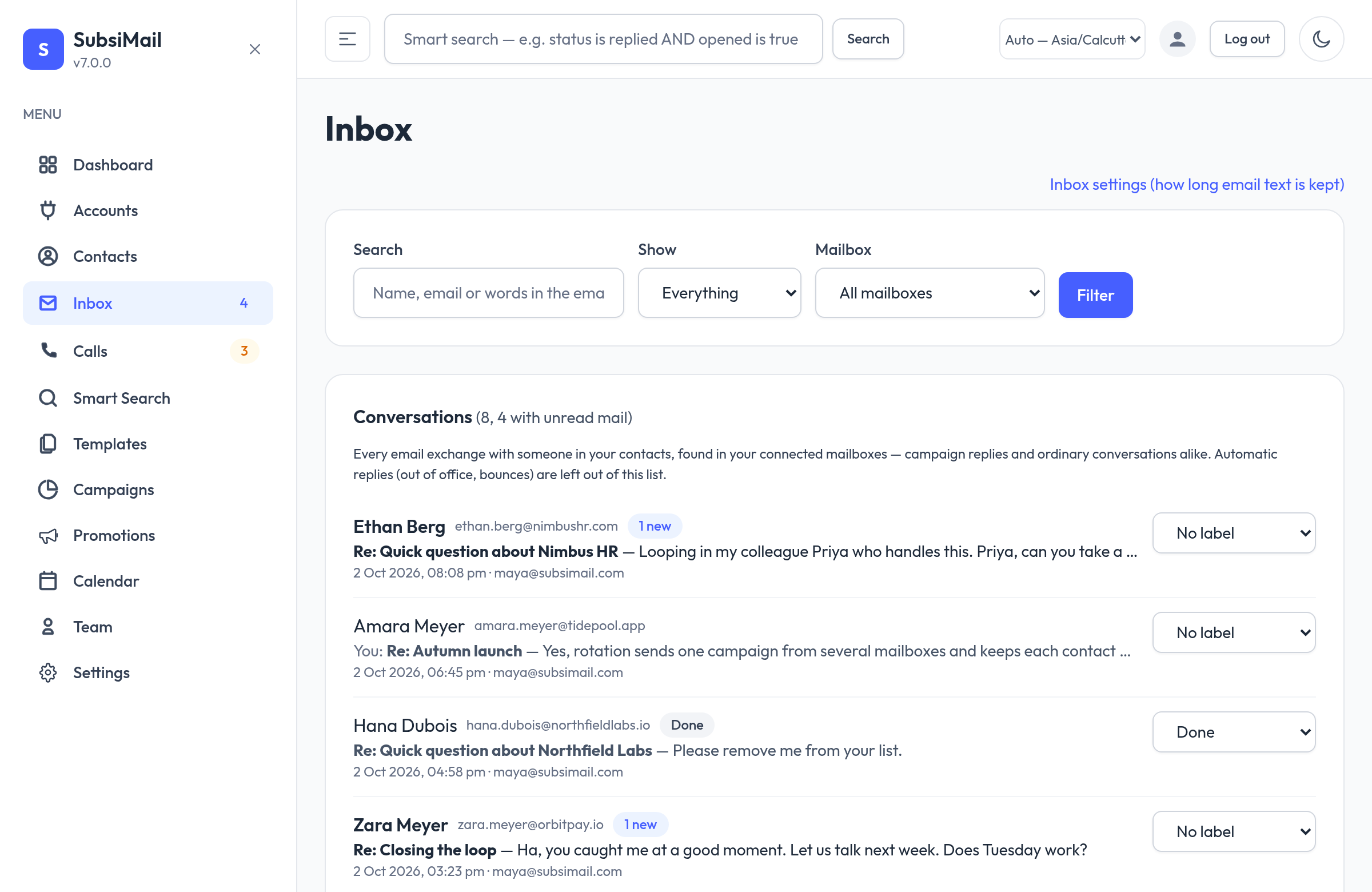
Unified inbox New
Every email exchange with your contacts, across all your mailboxes, readable and answerable in one place — with labels, search, formatted view and a rich-text reply box. Instant on-screen alerts when a reply arrives.
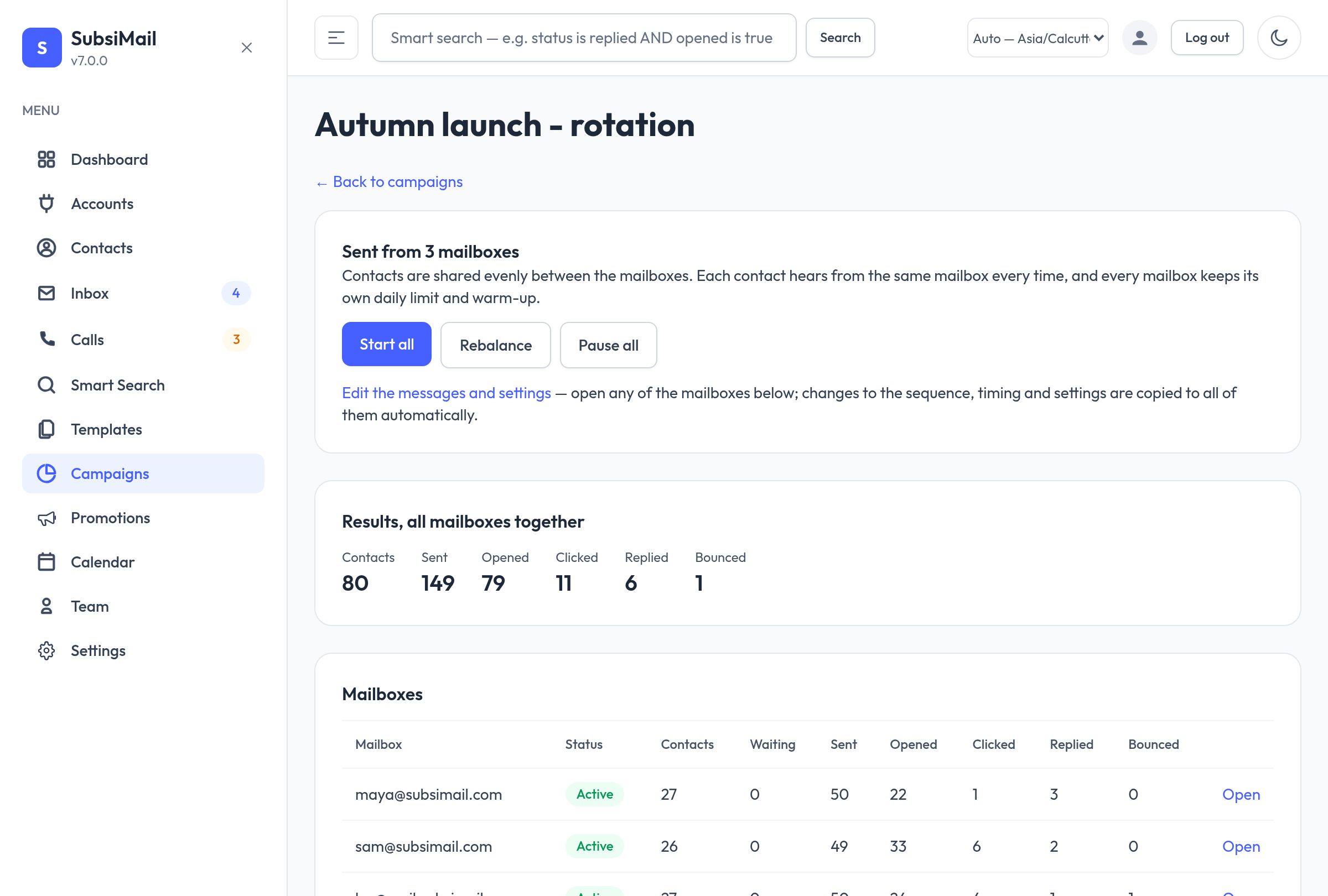
Mailbox rotation New
Send one campaign from several mailboxes. Contacts are shared out evenly, each one hears from the same mailbox every time so threads stay together, and edits copy to every mailbox.
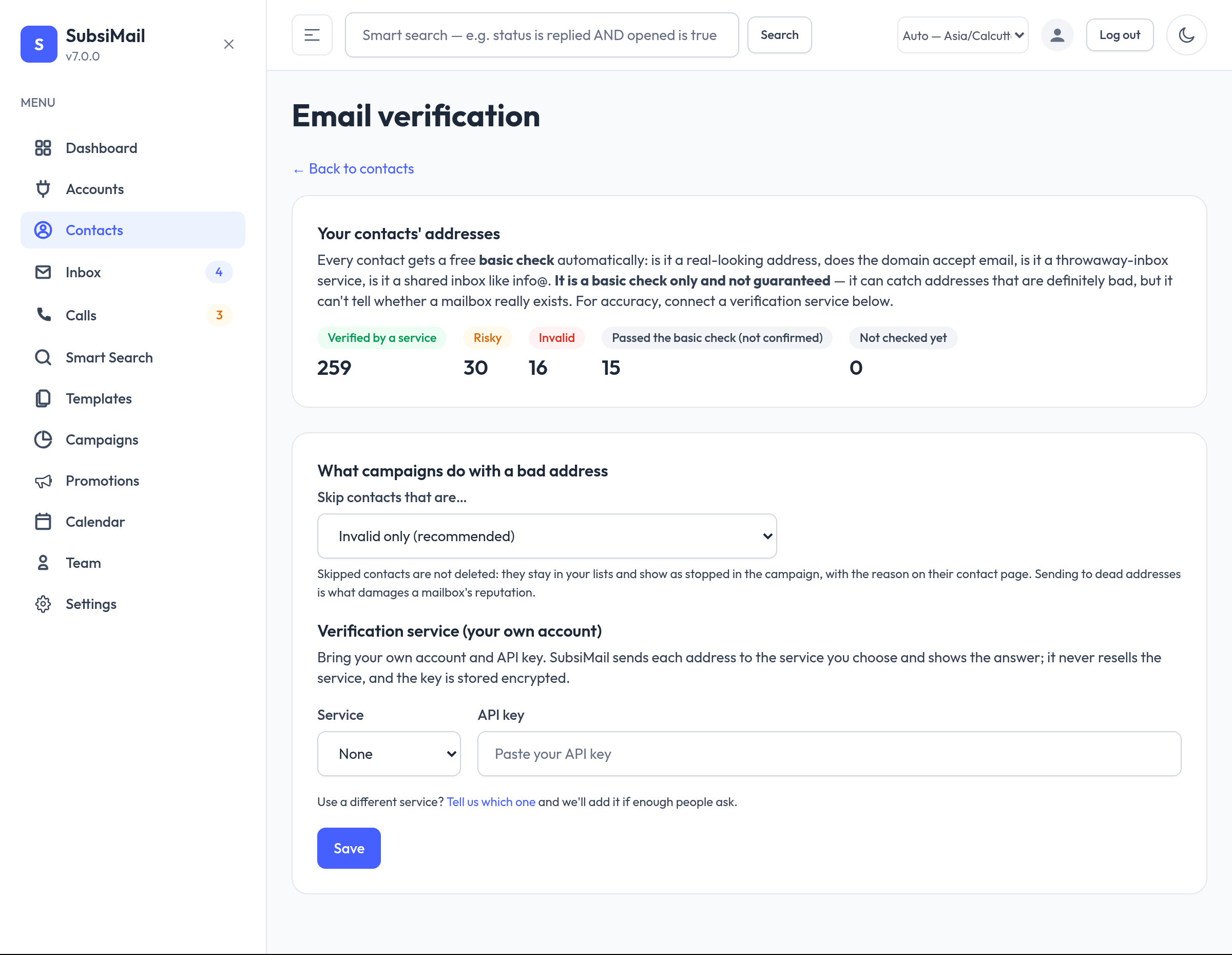
Email verification New
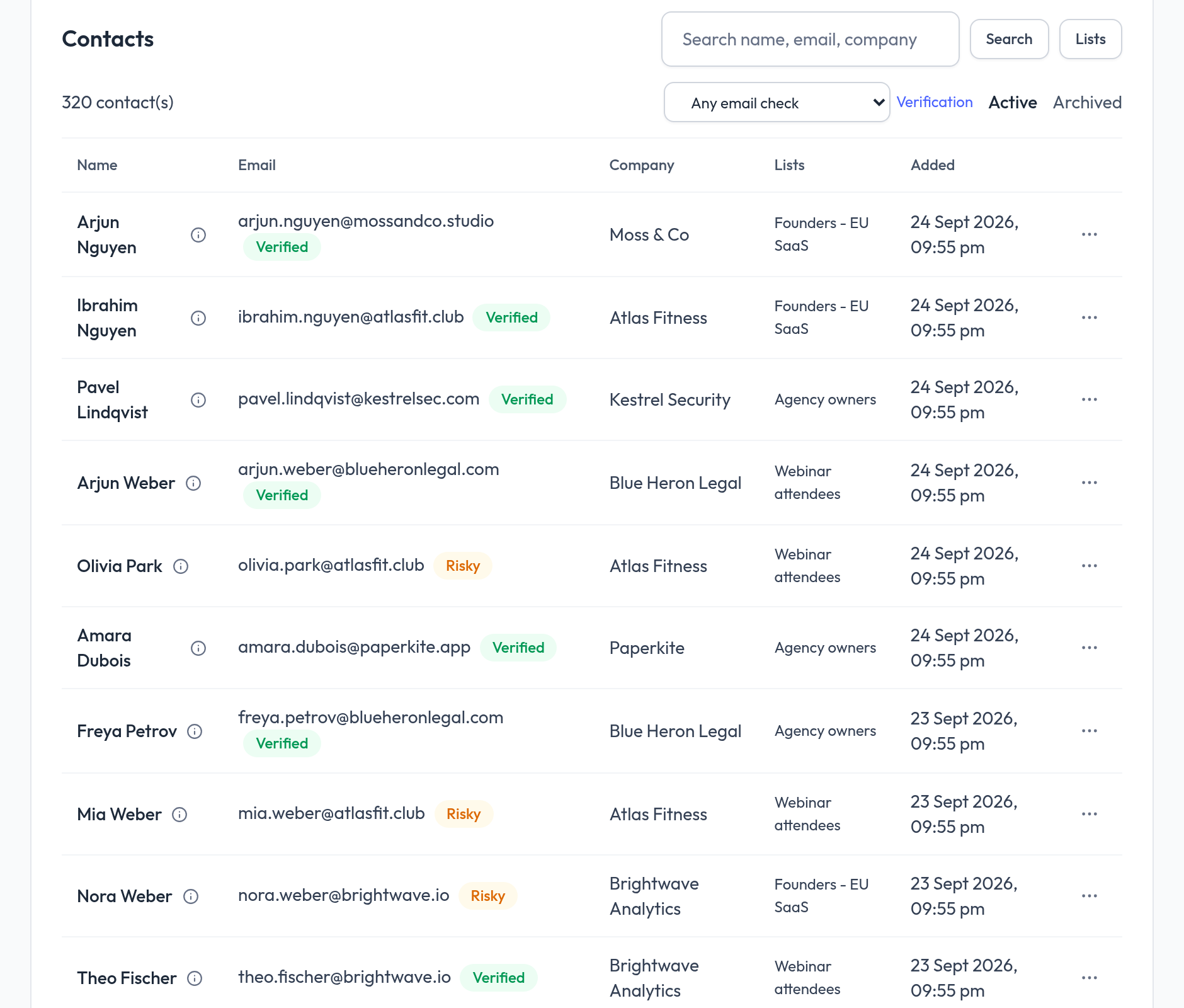
A free, automatic basic check on every contact, plus optional deep checks through your own ZeroBounce or MillionVerifier account. Bad addresses are skipped before they can hurt your reputation.
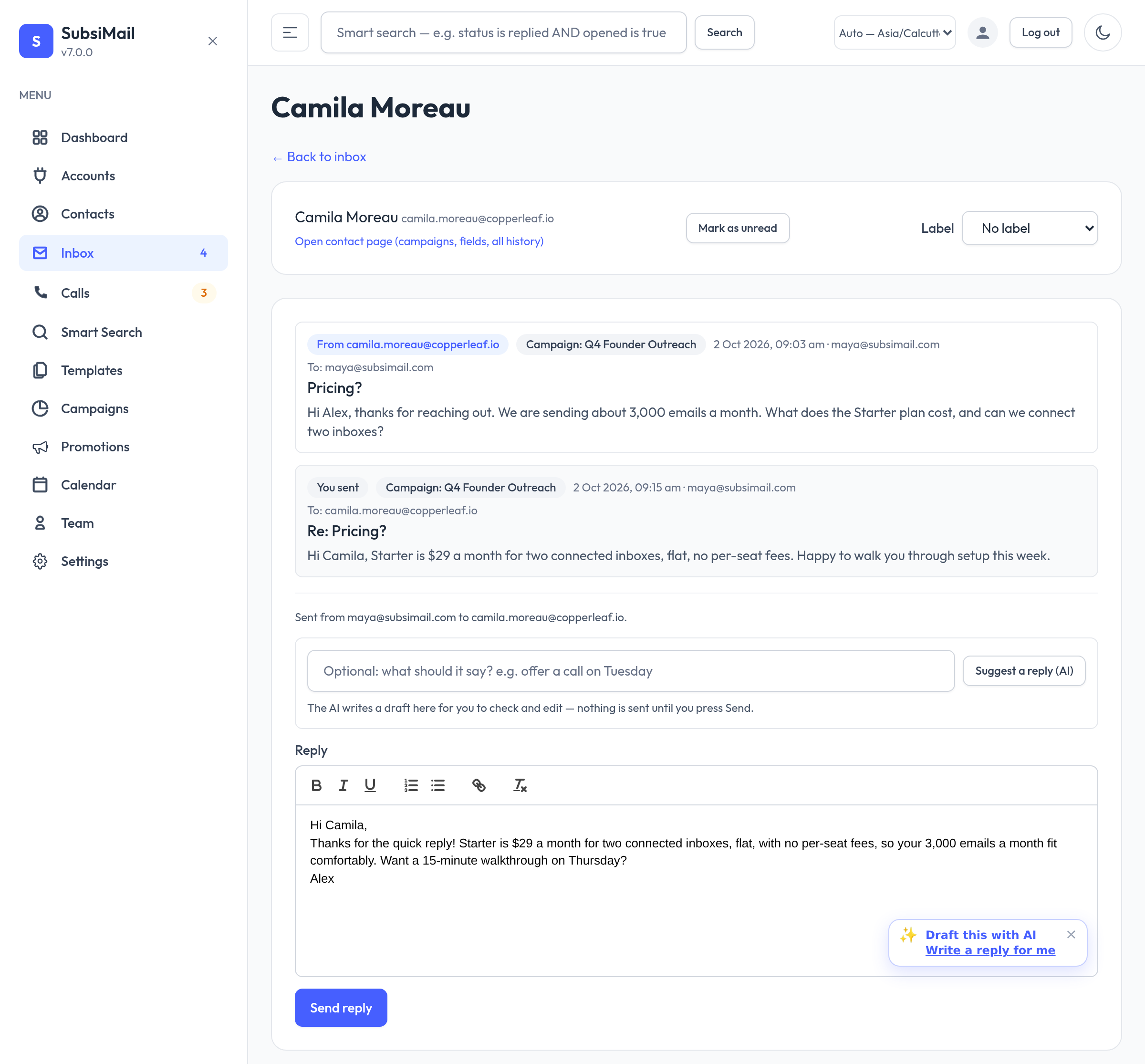
AI drafts, your own key New
Draft replies and sequence emails with Claude or any OpenAI-compatible model using your own API key. You pay your provider directly, and a person always presses Send — nothing is ever sent automatically.
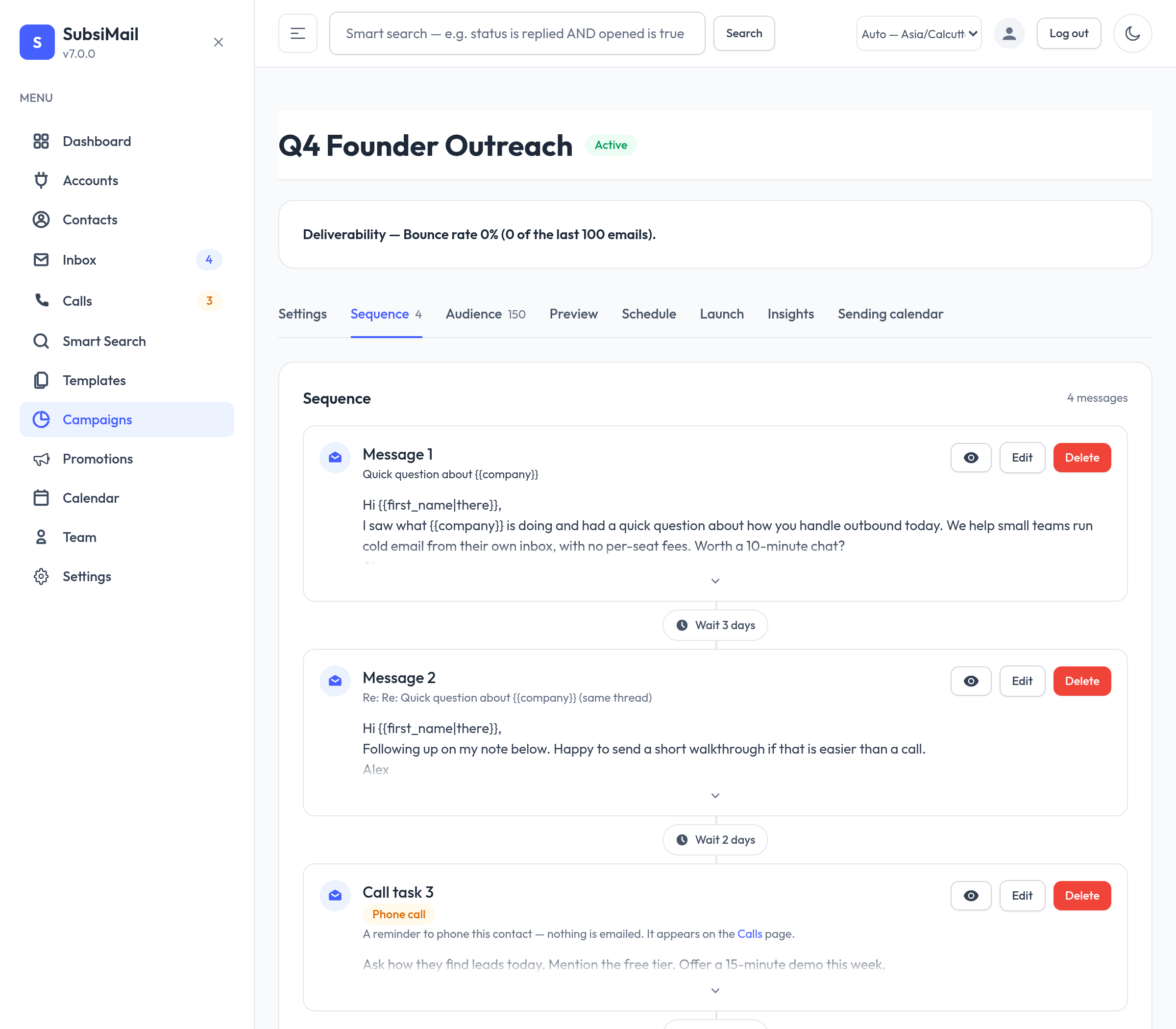
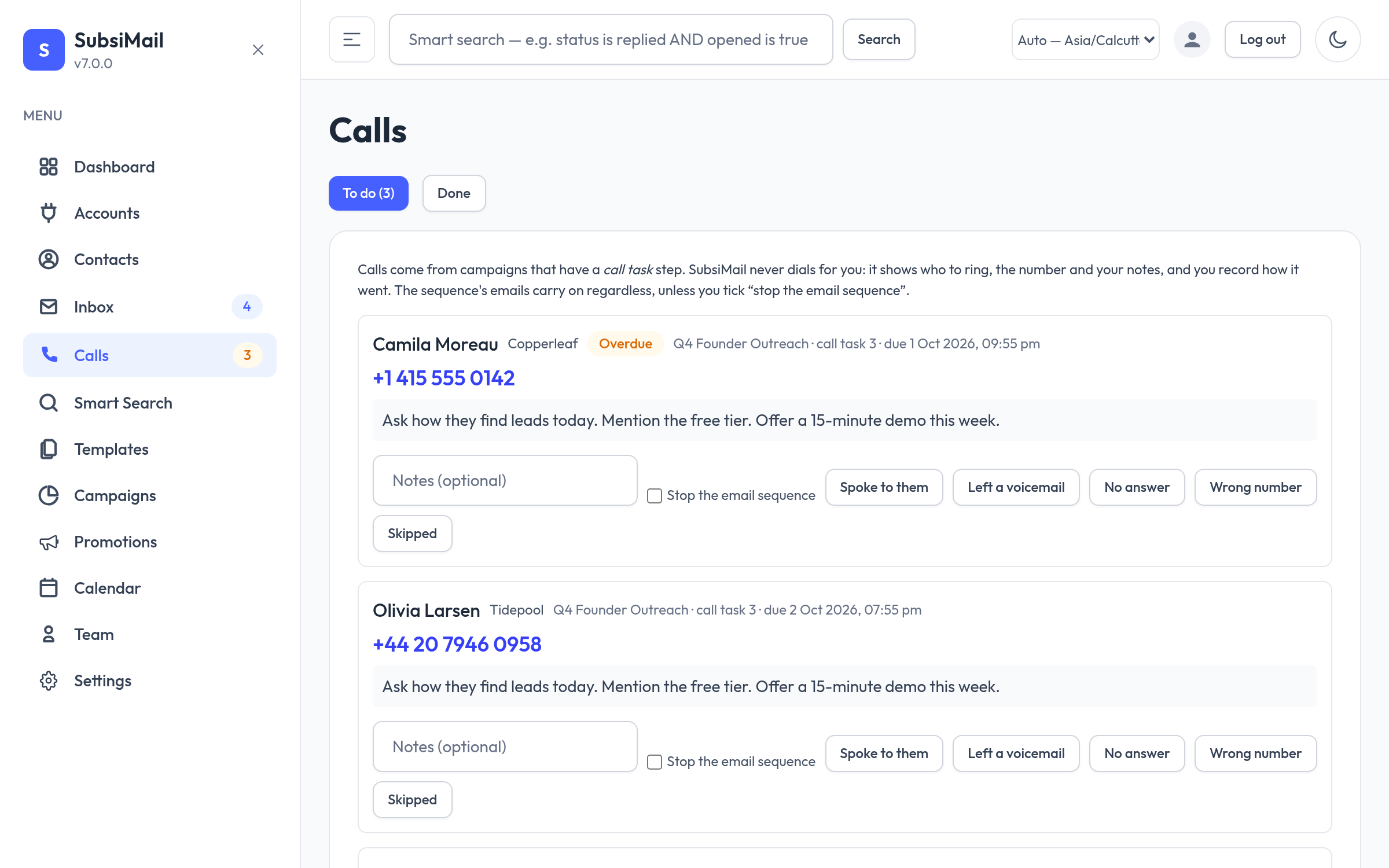
Call tasks in sequences New
Add a phone-call step between emails. SubsiMail queues it on a Calls page with a tap-to-call number and your notes, and logs how it went.
Domain health checks New
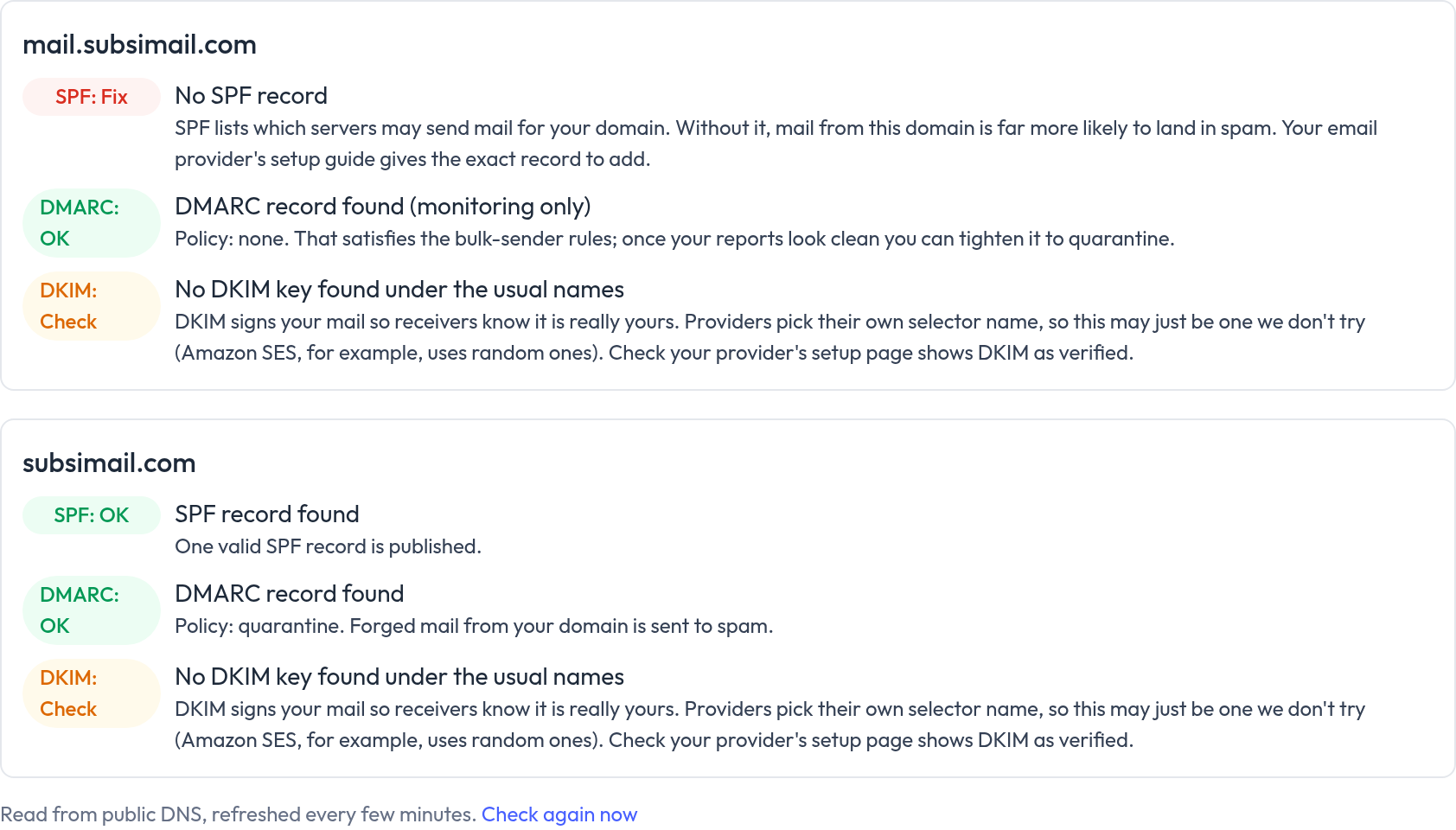
SPF, DMARC and DKIM checked for every domain you send from, with plain-language fixes right on your dashboard.
Multi-step sequences
Threaded follow-ups that land as one conversation, not disconnected emails.
Connect your own inboxes
Gmail, Outlook, or plain SMTP/IMAP — bring your own connection, no shared sending infrastructure.
Open & click tracking
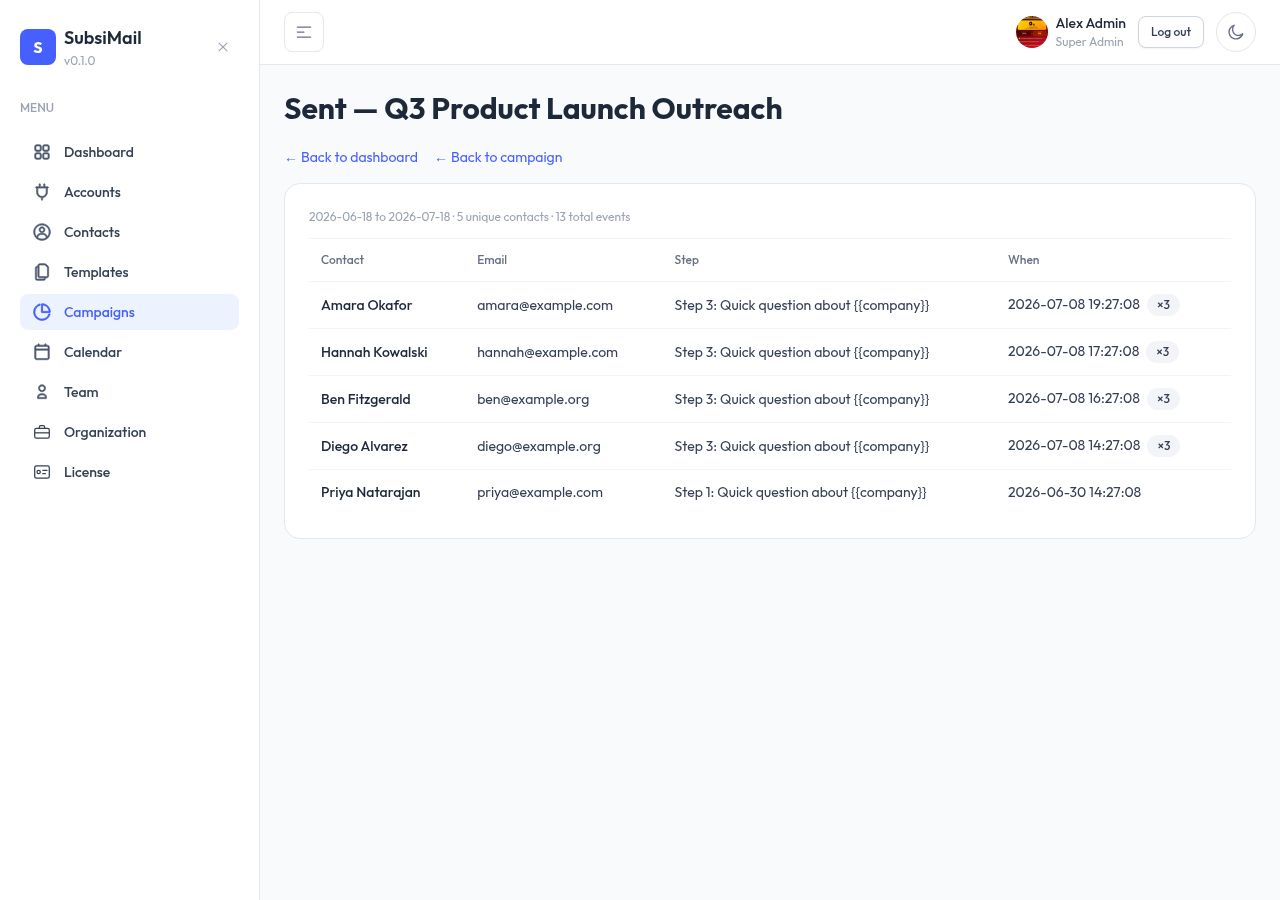
Per-contact event history, dashboard drill-down, no black-box analytics.
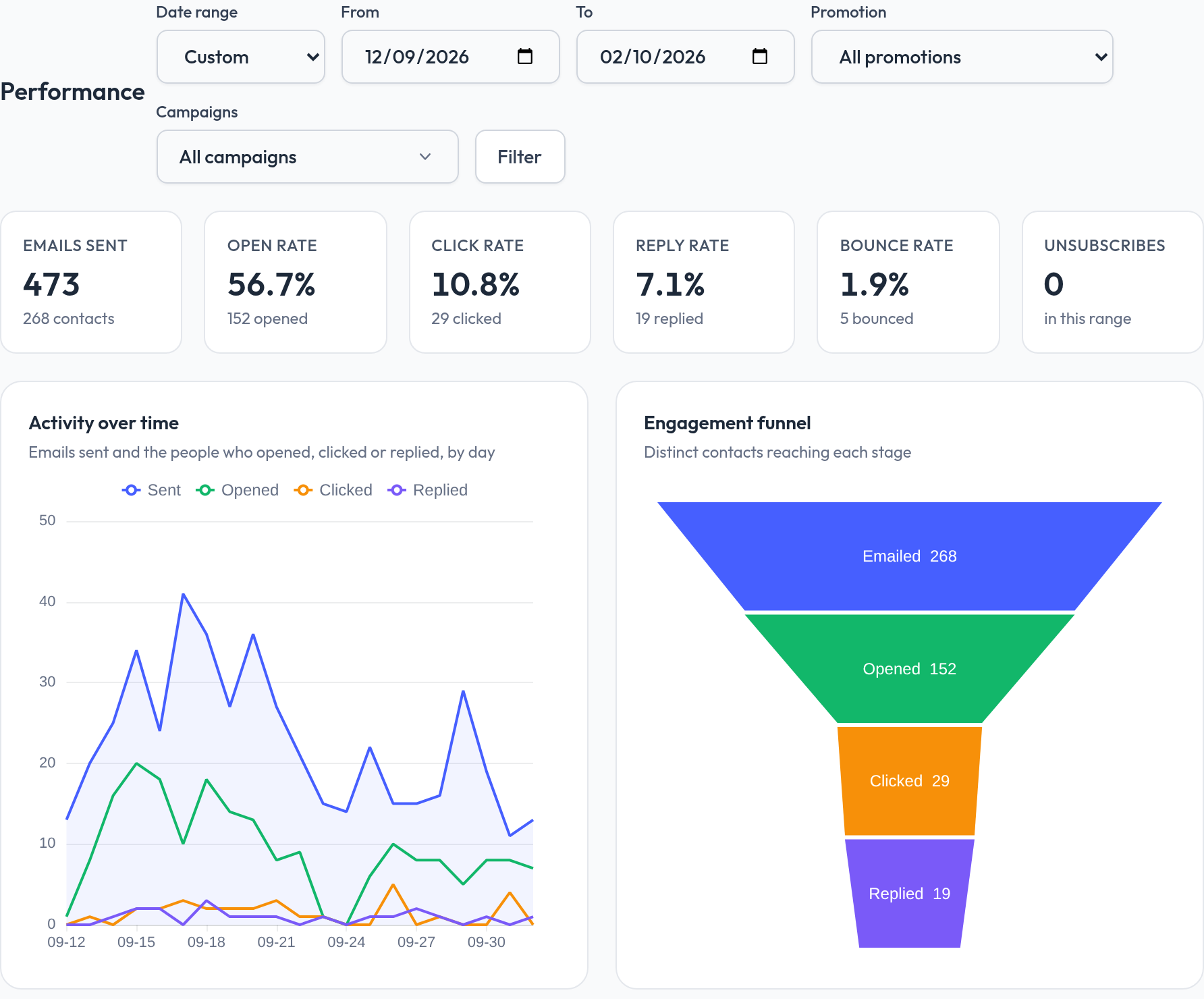
Charts & a world map — no external APIs
Rates, an over-time chart, an engagement funnel and a country-by-country map of where opens come from, filterable by date range and campaign. Geolocation runs on an embedded local database — no IP address ever leaves your server.
Reply detection
Sequences stop automatically the moment a contact replies, and the reply shows up in your inbox.
Contact lists & typed custom fields
CSV / Excel import, segment by list, merge-tag anything you track — fields are typed (number, date, URL, yes/no…) and validated on the way in.
Sending limits & safety
Daily caps and randomized send intervals per account, built in.
Suppression lists
Global unsubscribe and do-not-contact handling across every campaign.
Webhooks & roles
Fire events to Slack, Zapier, Make, n8n or your CRM. Unlimited team members with prebuilt roles.
Full REST API
Every action in the UI has a JSON endpoint. Drive campaigns, contacts and lists from n8n, a cron job or your own backend — authenticate with a personal API key.
Per-resource sharing
Everything's team-visible by default, or scope a campaign, contact or template to just the people who should see it — enforced everywhere, UI and API.
Audit trail & archiving
Every change records who, when and from where. Nothing is ever hard-deleted — archive or soft-delete, restore later.
Sending calendar
Per-campaign send windows and time-zone-aware scheduling, so mail goes out in business hours.
AI-friendly
Not sure if it fits? Ask your AI.
SubsiMail's website, docs and pricing are written so ChatGPT, Claude, Grok, Perplexity, DeepSeek, Gemini and any other AI assistant can read and explain them accurately — we even publish a plain-text guide for AI at subsimail.com/llms.txt. Pick a question, click your assistant, and get an answer in seconds.
What is SubsiMail?
A plain-English explanation of what it does and who it's for.
Compare the cost
See how flat per-inbox pricing stacks up against per-seat tools.
Plan my setup
A step-by-step install plan for a VPS, Docker, Windows or a Raspberry Pi.
Is it right for me?
An honest fit check for agencies, recruiters and solo founders.
Using DeepSeek, Gemini or another assistant? Hit Copy prompt and paste it in — it includes the links, so your AI knows where to read.
SubsiMail vs. a hosted outreach tool
| SubsiMail | Hosted SaaS | |
|---|---|---|
| Where your prospect list lives | Your server only | Their servers |
| Can the vendor read your emails | No | Yes |
| Content / template review | None | Automated + manual |
| Prohibited industries | None | Long list |
| Account can be suspended | No | Yes, at their discretion |
| Pricing model | Flat, per connected inbox | Per seat + per contact |
| If you stop paying | App keeps your data, export any time | Data held hostage / deleted |
| AI & email verification | Your own provider accounts and keys, billed by them | Bundled credits and add-on fees |
| Sending IP | Your own inbox | Shared pool |
See how we stack up specifically against Instantly, Smartlead, lemlist, or Apollo.
Teams using SubsiMail
Businesses running their own outreach and follow-ups on a SubsiMail install they control.
“We’re always reaching out to new restaurants, and SubsiMail runs the whole outreach and follow-up cycle automatically. No one’s sending emails and chasing replies by hand anymore.”

“We build a sequence once in SubsiMail and let the follow-ups run themselves — and it all still sends from our own mailboxes, not someone else’s platform. For an agency, that’s exactly right.”

“SubsiMail turned our outreach into proper sequences with automatic follow-ups. We’ve stopped sending emails one at a time and trying to remember who still needs a reply.”

“Self-hosting SubsiMail gave us our own system for outreach and follow-up campaigns, without paying for another expensive SaaS. It’s fully ours.”

Deploy in 3 steps
Sign up
Free forever for your first connected inbox. Grab your license key.
Deploy
docker compose up on your own server. One container, one command.
Connect & send
Connect an inbox, write your sequence, enroll a list, go.
Not technical? We'll set it up for you.
One-time $50 and we deploy SubsiMail on your server, connect your first inbox, and hand it over running. After that there's nothing to maintain but docker compose pull.
Runs on your stack
Same build everywhere — one self-contained binary, or the Docker image. Currently v8.0.2 — see the full changelog.
Docker
One image, docker compose up. The recommended way to run and update.
Linux
Single static binary, x86-64. No runtime to install, no dependencies.
Download for Linux Linux setup guideRaspberry Pi / ARM64
Single static binary, arm64. Runs directly on a Pi 4/5 or any ARM board — no Docker needed.
Download for ARM64 Raspberry Pi setup guideWindows
Standalone .exe. Double-click to run, or install as a service.
Pricing
Pay for connected inboxes, not seats. Every plan includes every feature.
Not sure yet? Try the live demo first — no card required
- Unlimited team members, always — you only pay per connected inbox, never per seat
- Unlimited sends and contacts on every plan, including Free
- Prebuilt roles (Super Admin, Admin, Manager, View Only) included on every plan, set per workspace
- Workspaces for every client, each with its own plan: two are free, the second paid workspace is 20% off and every one after that 10% off
- Webhook delivery and a full REST API on every plan — wire SubsiMail into n8n, Zapier, Make, your CRM, or your own code
No risk: cancel any time and the app keeps running on your server with all your data. Your first payment is covered by a 14-day, no-questions refund — email us within 14 days and we'll return it.
FAQ
Can I run this for several clients?
Yes. Give each client a workspace: its own contacts, campaigns, mailboxes, templates and plan, kept completely apart, behind one install, one login and one URL. Your team gets a role per workspace. Two workspaces are free; see SubsiMail for agencies.
What does self-hosted mean for my data?
SubsiMail runs entirely on your own server. The only thing that leaves it is a periodic license check — your license key, a random install ID, your app version, which build it is (Linux, Windows or Docker), and two counts (total emails sent and total campaigns) that show on your account page. We never see your email content, your contacts, who you're emailing, or your reply data. There is no "our copy" of anything that matters.
Does self-hosting hurt my deliverability?
No — and this is a common misunderstanding. SubsiMail doesn't send from your server's IP. It relays through your connected Gmail, Outlook, or SMTP account, so recipients see that provider's reputation, exactly like a hosted tool relaying through the same account. What still matters is your own sending discipline: a warmed domain, sane daily caps (built in), and a clean list. SubsiMail handles pacing and reply-stop; domain warmup is on you.
I'm not technical. Can I still run this?
Yes. If you can copy-paste one command you can run it — the Docker guide walks through it. If you'd rather not, pay a one-time $50 and we'll deploy it on your server and hand it over running. After that, updates are a single docker compose pull.
What server do I need?
Anything that runs Docker. A $5/month VPS is enough for most teams. One container, with its database built in.
What happens if I cancel, or if SubsiMail the company disappears?
The app is on your server, so it keeps running. Your data stays intact and you can export contacts to CSV any time. A lapsed license pauses sending and reply-checking, not access to what you already have — we never remotely disable, lock, or delete your instance or its data, for any reason.
Does SubsiMail use AI, and is it safe?
Only if you turn it on, and only to draft: a reply in the inbox or an email in a sequence. You connect your own Claude or OpenAI-compatible key, you pay that provider directly, and a person always reads, edits and presses Send — nothing is ever sent automatically. When you ask for a draft, the recent emails of that conversation go to the provider you chose, under their terms; that is the only time email text leaves your server.
Is cold email legal?
B2B outreach is legal in most places when you follow the local rules — accurate headers, a real physical address, and a working opt-out (CAN-SPAM in the US; GDPR/PECR add consent and legitimate-interest requirements in the EU/UK). SubsiMail gives you suppression lists and unsubscribe handling; staying compliant is your responsibility, not ours to police.
Do you offer a hosted version?
Not today — self-hosting is the whole point of the product. If running your own server is a dealbreaker, the $50 setup service is the middle ground.
How do I contact you?
Email support@subsimail.com, or open a ticket from the Support page. A real person replies.
How is this different from Mailshake or Instantly?
Same core workflow — sequences, follow-ups, tracking, reply detection. The difference is ownership: they're hosted SaaS that store and read your outbound mail, and most price per seat or review your content. SubsiMail is software you run, with none of that. See the specifics: vs. Instantly, vs. Smartlead, vs. lemlist, vs. Apollo.
More questions? Read the full FAQ
Still stuck? Email us at support@subsimail.com and a real person will reply.
Run your own cold-email tool.
Already a fan? Earn 40% commission for a year, then 20% for life →
Questions before you start? support@subsimail.com