Charts & maps
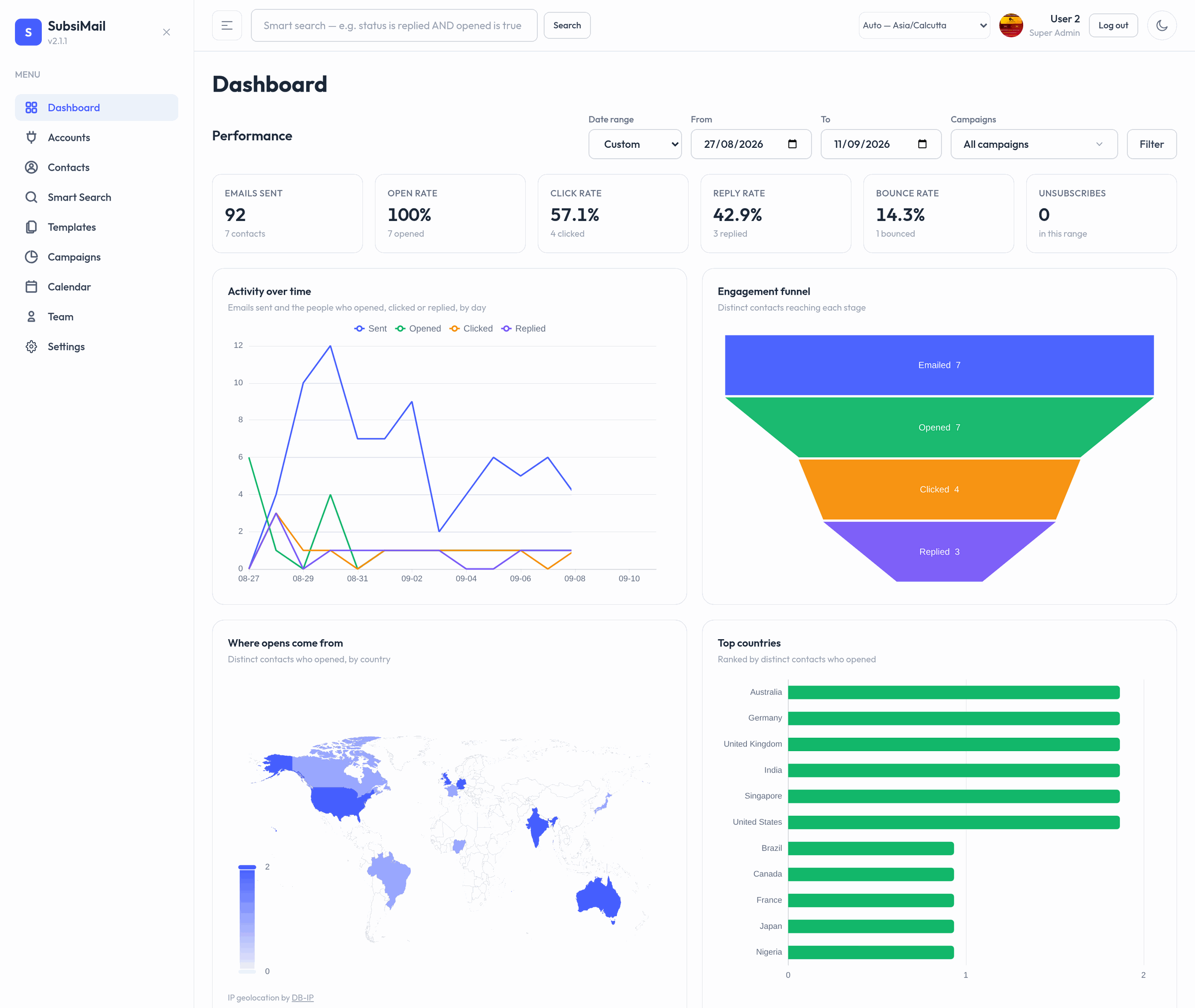
The dashboard shows a visual summary of every campaign's performance for the date range you pick, on top of the campaign breakdown table. Pick a quick range (Today, This week, This month, …) or a custom From / To, filter down to specific campaigns, and every card, chart and the map update together.
Summary rates
Six cards across the top: emails sent, open rate, click rate, reply rate, bounce rate and unsubscribes. The rates are share of people, not share of events — the denominator is the number of distinct contacts emailed in the range, so a contact opening the same email five times still counts once.
The charts
| Activity over time | Emails sent, and the distinct contacts who opened / clicked / replied, per day. |
| Engagement funnel | Emailed → opened → clicked → replied, as distinct contacts. |
| Top countries | Countries ranked by distinct contacts who opened. |
| Campaigns by volume | Your busiest campaigns in the range, with reply rate in the tooltip. |
The world map
"Where opens come from" shades each country by how many distinct contacts there opened an email. The country is worked out from the IP address that loaded the tracking pixel, against a country-level database bundled inside SubsiMail — the lookup is entirely local, nothing about your recipients is sent anywhere. Attribution for that database (DB-IP) is shown under the map.
Opens with no resolvable location (a private network, a corporate proxy, an IP the database doesn't know) simply don't appear on the map.
Per-campaign Insights
Every campaign has its own Insights tab with the same cards, charts and map scoped to that one campaign, plus a per-step performance chart — sent / opened / clicked / replied at each step of the sequence, so you can see which follow-up is actually pulling its weight. It has its own date filter, independent of the dashboard.
What's collected
From version 2.1.0, each open and click event also stores a two-letter country code (resolved as described above). It shows in the drill-down tables next to each contact. No city, no coordinates, no IP is stored on the event — just the country. Events recorded before you upgraded have no country and are counted as "unknown".